
FloppaOS
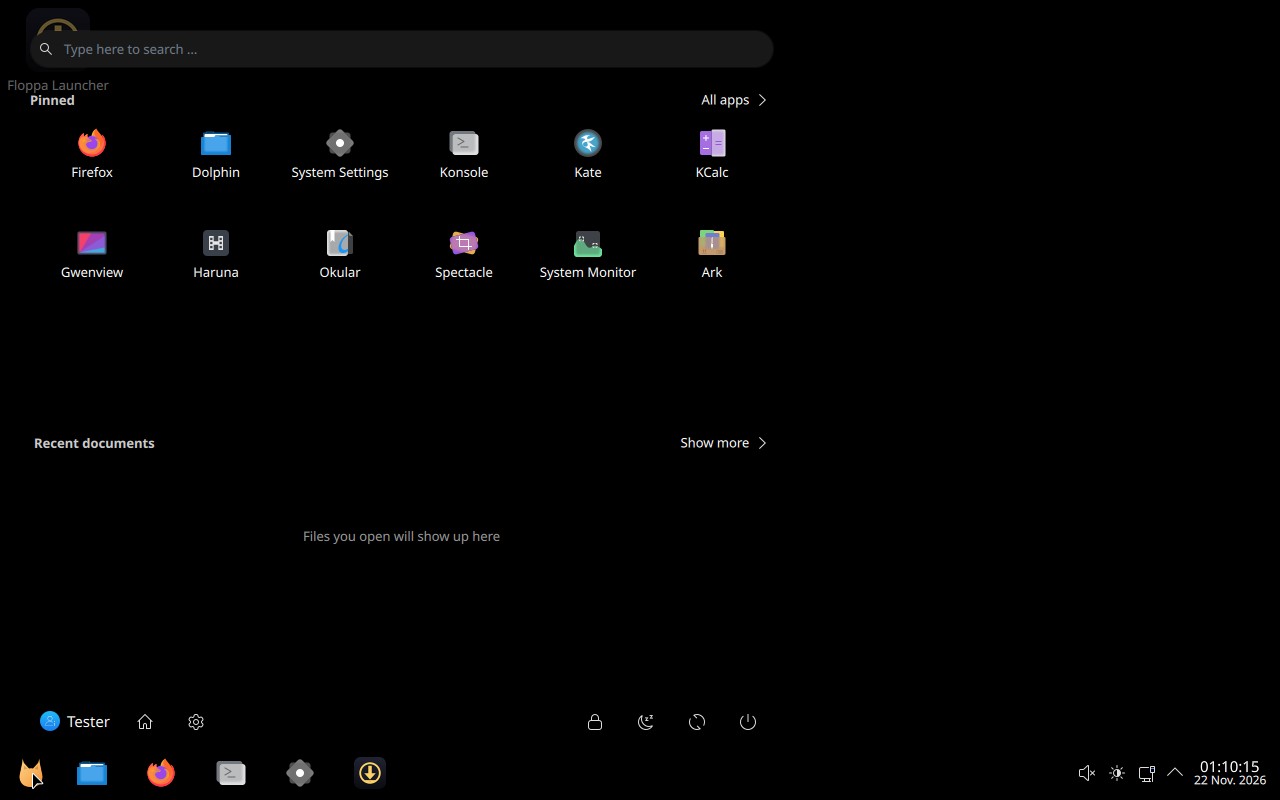
A free gaming Linux with the desktop you know from Windows 11: a start button, a start menu with search, a taskbar and the same keyboard shortcuts. Everything is pure black, made for OLED screens.
Not released yet. Version 0.1.0 is in testing.
What you get
- The desktop you know
- The start button sits on the far left. FloppaOS Start has search and pinned apps, the taskbar has a small clock, and Windows shortcuts like Win+E, Win+D, Win+L and Win+Tab work.
- Pure black
- The desktop, the start menu and the lock screen are pure black, so OLED pixels stay off. No night-light tint, no splash screen.
- Floppa games built in
- Floppa Setup installs the Floppa Launcher and pins it to the taskbar. The launcher installs and updates the Floppa games, and every Floppa game has FloppaNet: press F2 in a game.
- Ready for games
- Vulkan graphics, 32-bit support, MangoHud, GameMode and gamescope come installed.
- Next to Windows
- The installer can put FloppaOS next to Windows. Tick Secure Boot in the installer and FloppaOS starts with Secure Boot on, so Windows games that need it keep working.
- Free and open source
- The code is GPL-3.0 and on GitHub. FloppaOS is based on Arch Linux, so the system and the drivers stay up to date.
Try it now on CachyOS
Already using CachyOS with KDE Plasma? The Setup Pack gives it the FloppaOS look and Floppa Setup. Open Konsole and type:
git clone https://github.com/KianFloppa/floppaos.git
cd floppaos
./install.sh
Then log out and back in once. To go back to KDE's own look, type ./uninstall.sh in the same folder. The install guide has every step.
Download the FloppaOS ISO
The installer image comes with the first release, 0.1.0. It will be here, with its SHA-256 checksum so you can check the download. Releases also show up on GitHub.
- PC
- 64-bit, starts with UEFI
- Memory
- 2 GB to install, 8 GB or more for games
- Disk
- 20 GB free, more for games
- Graphics
- AMD Radeon. Intel and NVIDIA come later.
- USB stick
- 4 GB or more
Good to know
- Some online games with kernel anti-cheat only run on Windows. Keep Windows and install FloppaOS next to it.
- The USB stick starts with Secure Boot switched off. The installed FloppaOS can run with it on.
- FloppaOS is made by one person and has been tested in virtual machines so far. Real PCs come before 0.1.0.
Open source
The code is on GitHub under GPL-3.0: read it, build the ISO yourself, or send fixes. The name FloppaOS, the caracal logo and the artwork are not under the GPL and stay with KianFloppa, so forks need their own name and logo (TRADEMARKS.md).
Found a security problem? Please report it privately first: the contact is in security.txt.